
The debate around DNS vs VPN often gets oversimplified. One is framed as “basic,” the other as “secure.” In reality, they solve very different problems, and choosing the wrong one can mean slower speeds, higher latency, or a false sense of privacy.
This guide breaks down the difference clearly—without brand bias—and shows how DNS and VPNs perform in gaming, privacy, remote work, and geo-access, so you can make an informed decision.
What Is DNS? (And Why You Use It Every Day)
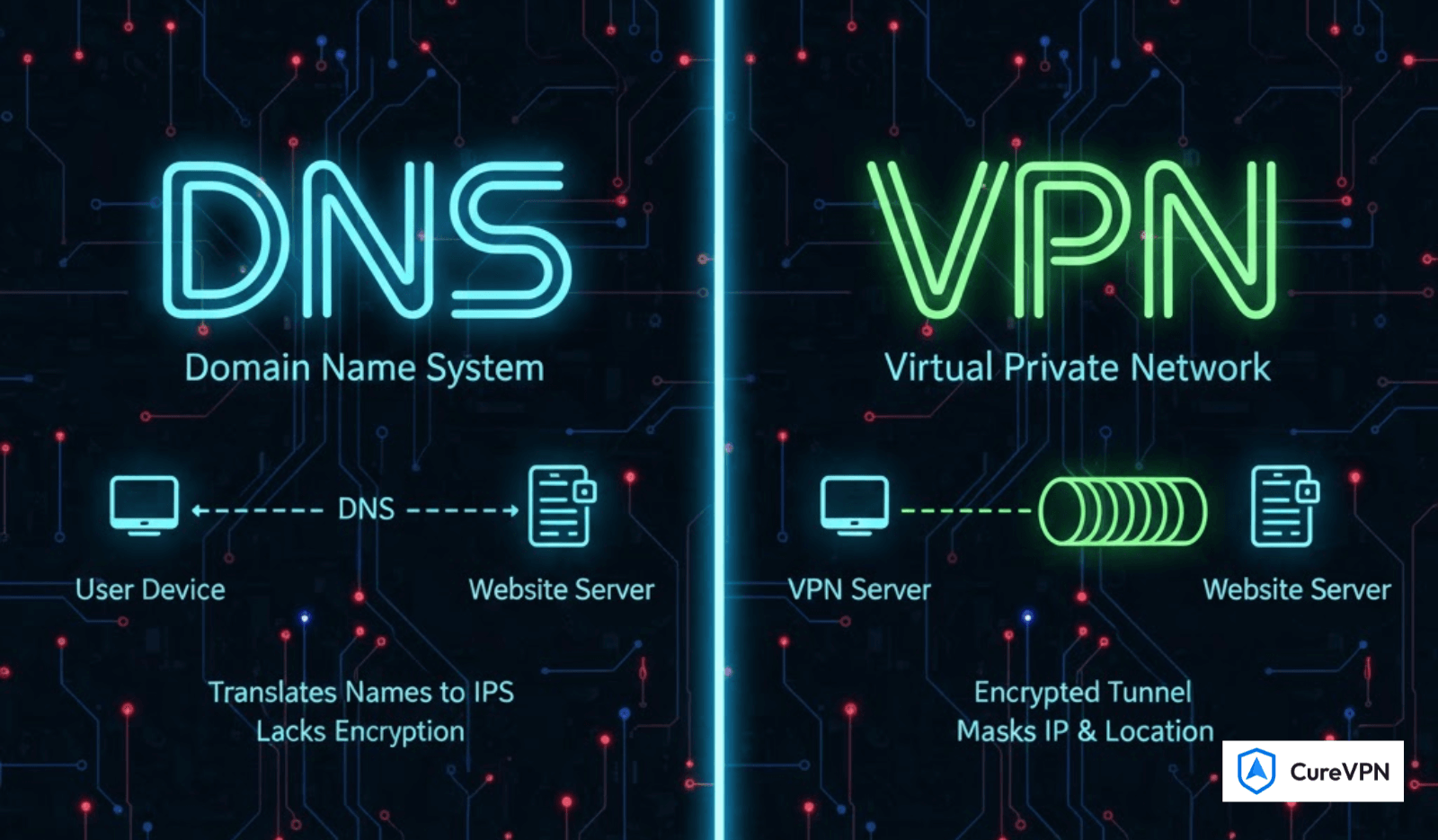
DNS, or Domain Name System, is the internet’s translation layer. When you type a website name into your browser, DNS converts that human-readable address into an IP address that computers understand. Without DNS, the modern web simply wouldn’t function.
Key Characteristics of DNS
- Translates domain names to IP addresses
- Does not encrypt your internet traffic by default
- Handles only domain-based requests
- Operates silently in the background
Most users rely on DNS servers provided by their ISP, which often means:
- Slower resolution speeds
- Logged browsing requests
- Minimal control or filtering
What Is Smart DNS?
A Smart DNS builds on standard DNS by selectively routing certain requests through servers in other regions. This allows websites to think you’re accessing them from a different country—without encrypting your traffic.
Smart DNS Is Commonly Used For:
- Accessing geo-restricted streaming platforms
- Faster region switching with minimal speed loss
- Devices that don’t support VPN apps (Smart TVs, consoles)
However, it’s important to understand the limitation: Smart DNS does not protect your data. Your ISP can still see what you’re doing.
What Is a VPN? (And Why It’s Fundamentally Different)
A VPN (Virtual Private Network) creates an encrypted tunnel between your device and a remote server. Unlike DNS, it covers all internet traffic, not just domain lookups.
What a VPN Actually Does
- Encrypts all data leaving your device
- Masks your real IP address
- Prevents ISP tracking and throttling
- Secures public Wi-Fi connections
This is why VPNs are widely used for:
- Privacy protection
- Torrenting
- Remote work
- Competitive online gaming (when configured properly)
DNS vs VPN: The Core Differences That Matter
| Feature | DNS | VPN |
|---|---|---|
| Encrypts traffic | ❌ | ✅ |
| Hides IP address | ❌ | ✅ |
| Bypasses geo-restrictions | ⚠️ Limited | ✅ |
| Affects internet speed | Minimal | Depends on server |
| Protects non-DNS traffic | ❌ | ✅ |
| Suitable for gaming | ⚠️ Situational | ✅ (with right server) |
DNS vs VPN for Gaming: What Actually Improves Performance?
This is where most articles fail to explain reality.
Does DNS Reduce Lag?
DNS does not reduce in-game latency. It only affects how quickly a game server is resolved—not how data travels during gameplay. If you’re searching for How to Fix Lag in Call of Duty, DNS alone won’t help.
When a VPN Helps Gamers
A properly optimized VPN can:
- Bypass ISP throttling
- Stabilize routing paths
- Reduce packet loss
This is especially relevant when selecting Best Warzone Server Locations, where routing quality matters more than raw distance. Many competitive players now rely on tools like Cure VPN, particularly when seeking:
- Best Gaming VPN for COD Players
- Access to easier matchmaking pools
- More stable server connections
For advanced players, guides like a Free Bot Lobby VPN Guide often explain how VPN routing—not DNS—affects lobby difficulty.
DNS vs VPN for Streaming & Geo-Access
If your only goal is watching region-locked content:
- Smart DNS offers faster speeds
- No encryption overhead
- Simple setup
But if privacy matters—even slightly—a VPN is the safer choice.
DNS vs VPN for Remote Work & Security
For professionals using remote systems:
- DNS offers zero protection
- VPNs encrypt sensitive traffic
If you’re researching the Best VPN for Remote Desktop, DNS is not an option—it’s a risk.
VPN Use Cases DNS Cannot Replace
- Torrenting
- Public Wi-Fi security
- Workplace data protection
- ISP surveillance avoidance
- Games like Warframe where routing stability matters
(often discussed under Best VPN for Warframe)
Final Verdict: DNS vs VPN — Which Should You Use?
Choose DNS if:
- You want faster region switching
- Privacy is not a concern
- You’re streaming on limited devices
Choose a VPN if:
- You care about privacy or security
- You game competitively
- You work remotely
- You want full control over your traffic
For many users, DNS is a convenience tool. A VPN is a protection tool. Understanding that difference is what actually matters.
Bottom Line
DNS vs VPN isn’t about which is “better.” It’s about what problem you’re trying to solve.
Once you understand that, the choice becomes obvious.