
UDP is faster and better for streaming, gaming, and VoIP. TCP is more reliable and better for bypassing firewalls, accessing restricted networks, and transferring files where every packet matters. Most VPN apps default to UDP for good reason. Switch to TCP when your connection drops constantly or when you’re on a restrictive network that blocks non-standard ports. The right answer depends entirely on what you’re doing.
Pick up any networking guide and you’ll see the same oversimplified advice: “UDP is for speed, TCP is for reliability.” That’s technically true, but it explains nothing about what actually happens inside a VPN tunnel or why your choice of port matters as much as your choice of protocol.
The real story of TCP vs UDP VPN ports is about tradeoffs at the architecture level. It’s about what your network actually needs versus what most guides tell you to pick. And for anyone configuring a VPN on a router, setting up a business VPN, or just trying to make their VPN stop disconnecting every twenty minutes, the difference is genuinely consequential.
This article explains the mechanics clearly, maps the tradeoffs honestly, and tells you exactly how to decide.
What TCP and UDP Actually Do?
Both TCP (Transmission Control Protocol) and UDP (User Datagram Protocol) operate at the transport layer of the network stack. Both slice your data into packets and send those packets between endpoints. That’s where the similarity ends.
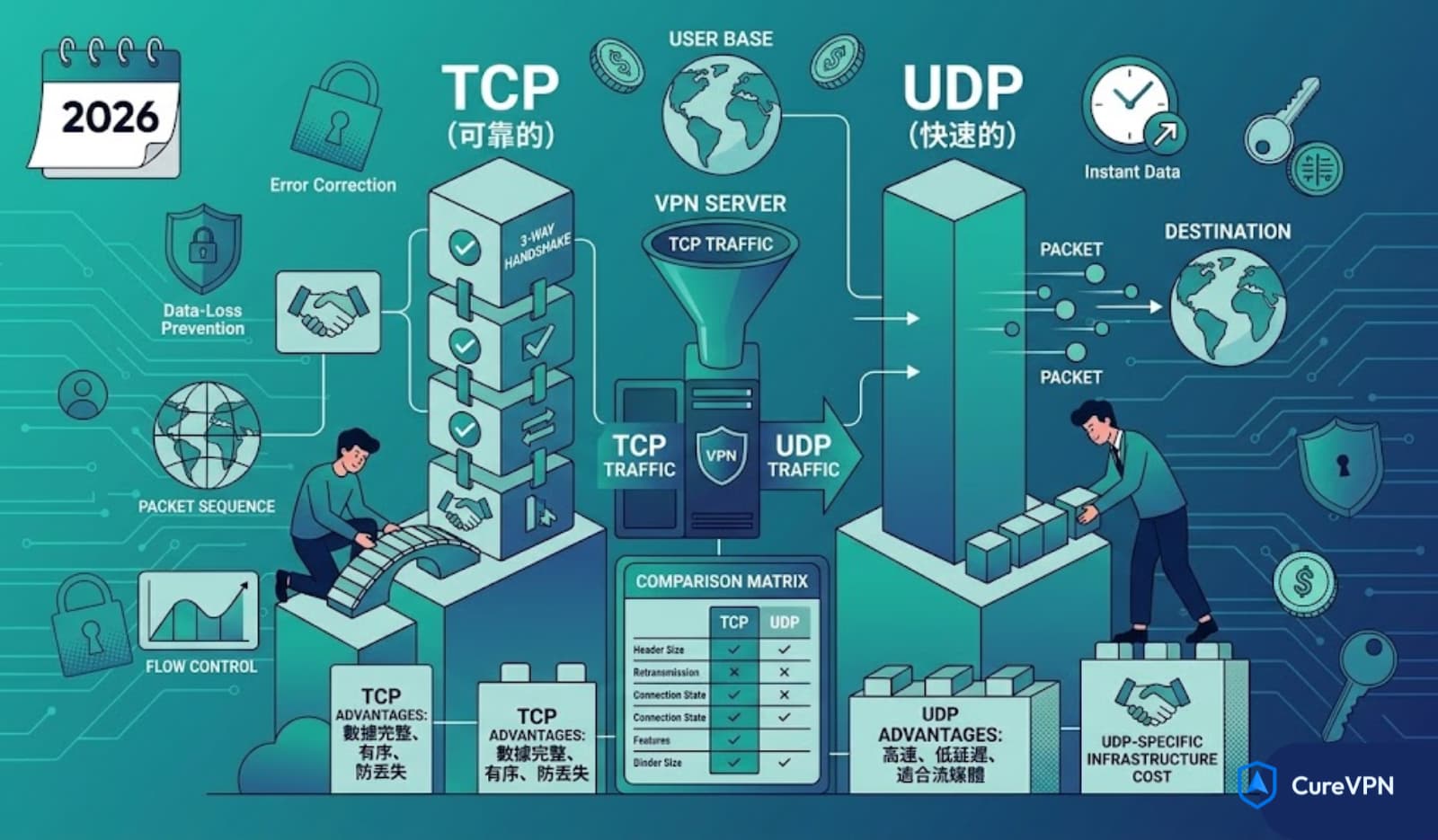
TCP uses a three-way handshake. Before any data moves, your device sends a SYN packet, the server replies with SYN-ACK, and your device confirms with ACK. After that, every packet gets acknowledged. If a packet goes missing, TCP detects the gap and retransmits. The data arrives complete and in the correct order, every time.
That reliability costs something. All that back-and-forth acknowledgment adds overhead. On a high-latency connection, the cumulative effect of waiting for acknowledgments before sending more data becomes noticeable. TCP also has a larger fixed header: 20 bytes compared to UDP’s 8 bytes. Small difference per packet, significant difference across millions of packets.
UDP skips the handshake entirely. It fires packets at the destination without checking whether they arrived. No retransmission, no sequencing guarantees, no connection state to maintain. The result is lower overhead, faster throughput, and meaningfully reduced latency on good connections.
The catch is that UDP’s speed advantage assumes a stable connection. On a lossy network, UDP just drops packets without recovering them. Whether that matters depends entirely on what the packets contain.
How TCP vs UDP VPN Ports Actually Work
When a VPN protocol runs over TCP or UDP, it uses specific port numbers to route traffic correctly. Think of the port as the apartment number inside an IP address building. The IP gets the data to the right building; the port gets it to the right tenant.
Different VPN protocols have default port assignments based on their design:
| VPN Protocol | Default Port | Transport |
|---|---|---|
| OpenVPN (default) | 1194 | UDP |
| OpenVPN (firewall-friendly) | 443 | TCP or UDP |
| IKEv2/IPSec (key exchange) | 500 | UDP |
| IKEv2/IPSec (NAT traversal) | 4500 | UDP |
| WireGuard | 51820 | UDP only |
| L2TP/IPSec | 1701 | UDP |
| PPTP | 1723 | TCP |
| SSTP | 443 | TCP |
The port number isn’t just an identifier. It affects how firewalls and network administrators treat your VPN traffic. Port 443 carries HTTPS traffic by default, which means VPN connections routed through TCP port 443 look like normal web traffic to most firewalls and deep packet inspection systems. This is why OpenVPN on TCP port 443 is the go-to configuration for restricted networks like corporate environments, school networks, and countries with aggressive VPN blocking.
The Core Tradeoff: Speed vs. Reliability
When UDP Wins
UDP dominates wherever real-time performance matters more than guaranteed delivery.
Streaming. A dropped frame in a video stream is rendered invisible by buffering and interpolation algorithms. Stopping to retransmit that frame would cause visible stuttering, which is far worse than a momentary quality drop. UDP’s packet-loss tolerance suits streaming exactly.
Online gaming. Game state updates arrive dozens of times per second. A position packet from three frames ago is already useless by the time a retransmission would arrive. Games are designed to handle packet loss with interpolation and prediction. Adding TCP’s retransmission overhead would introduce latency that makes competitive gaming unplayable.
VoIP and video conferencing. Audio streams, like video streams, prioritize continuity over completeness. A brief crackle is better than a two-second freeze caused by waiting for retransmitted packets.
General browsing on a stable connection. For most home networks with reliable fiber or cable connections, UDP’s overhead savings produce faster page loads and snappier VPN performance overall.
When TCP Wins
TCP becomes the right choice when reliability or network compatibility take priority over raw speed.
Restrictive firewalls. Many corporate and institutional networks block UDP traffic or flag unusual UDP ports. Routing OpenVPN through TCP port 443 bypasses most of these restrictions because the traffic pattern matches standard HTTPS. Networks that would block UDP port 1194 often pass TCP port 443 without inspection.
Censorship-heavy environments. Countries that actively block VPN protocols often target UDP-based connections first. TCP on port 443, combined with obfuscation layers, is the standard approach for making VPN traffic indistinguishable from regular web browsing.
Unstable or high-loss connections. On a mobile network with frequent packet loss, TCP’s retransmission mechanism prevents data corruption. UDP on a lossy connection produces incomplete or out-of-order data with no recovery path.
File transfers and email. Any task where data integrity is non-negotiable benefits from TCP’s delivery guarantees. Downloading a software update, sending an email, or transferring sensitive documents through a VPN tunnel works better over TCP.
The TCP-over-TCP Problem: Why This Matters
Here’s something most VPN guides skip entirely, and it’s important for anyone running a VPN on a router or configuring enterprise tunnels.
When you run a VPN protocol over TCP, you create a situation where TCP’s retransmission logic operates at two layers simultaneously. Your TCP-based VPN tunnel is already handling retransmission. The applications running inside that tunnel (if they also use TCP) add their own retransmission layer on top.
This creates what network engineers call TCP meltdown. On an unstable connection, both layers simultaneously detect packet loss and begin retransmitting. The doubled overhead and compounding backoff timers produce dramatically worse performance than either layer would alone.
The practical implication: on a poor-quality connection, UDP-based VPN tunnels often outperform TCP-based ones, even for reliability-sensitive applications. The single-layer overhead of UDP tunneling with application-level TCP running inside it is usually more efficient than double-stacking TCP.
This is exactly why WireGuard chose to build around UDP exclusively. The WireGuard design team concluded that UDP’s simplicity and single-layer overhead produced better real-world performance across nearly every use case. WireGuard handles its own packet loss compensation at the protocol level rather than relying on TCP retransmission.
VPN Port Numbers: What Gets Blocked and What Doesn’t
Network administrators and ISPs block VPN ports when they want to restrict VPN usage. Understanding which ports get targeted helps you choose the right configuration.
Commonly blocked ports:
- UDP 1194 (OpenVPN default) is well-known and frequently blocked on restricted networks
- UDP 51820 (WireGuard) is increasingly recognized and blocked in some corporate environments
- TCP 1723 (PPTP) is widely blocked and the protocol itself is insecure regardless
- UDP 500 and 4500 (IKEv2) get blocked in some enterprise environments that restrict all VPN traffic
Ports that typically pass freely:
- TCP 443 (HTTPS traffic) is almost never blocked because doing so would break all secure web browsing
- TCP 80 (HTTP) passes on most networks but lacks the camouflage value of 443
- UDP 53 (DNS) passes on most networks and is sometimes used by obfuscated VPN configurations, though this port brings its own complications
The strategic choice of TCP port 443 for OpenVPN is based on this reality. Blocking port 443 would mean blocking every HTTPS website on the internet, which no network administrator is willing to do. VPN traffic on that port effectively hides in plain sight.
TCP vs UDP for Specific VPN Use Cases
Streaming and Gaming
UDP is the right choice. The latency advantage of UDP translates directly to smoother performance. For gamers specifically, the combination of a fast DNS server and a UDP-based VPN minimizes the two biggest sources of connection delay.
Speaking of DNS, the best DNS server for PS5 and other gaming consoles (Cloudflare at 1.1.1.1 or Google at 8.8.8.8) pairs well with a UDP VPN configuration. Both optimizations target the same goal: reducing the milliseconds that stack up between user input and server response.
Business and Corporate VPN Setups
Business VPN deployments face different constraints than consumer setups. Corporate networks often implement deep packet inspection (DPI) and aggressive firewall policies. Remote workers connecting to a company VPN from a hotel network or airport Wi-Fi frequently encounter UDP port blocking.
For business VPN configurations serving remote teams, TCP port 443 provides the most consistent connectivity across varied network environments. The speed penalty is acceptable in exchange for reliability. Employees who can’t connect at all from certain locations don’t benefit from UDP’s speed advantage.
Business VPN infrastructure also needs to consider multi-tenant routing. When dozens or hundreds of simultaneous connections share the same VPN infrastructure, TCP’s connection state overhead becomes a meaningful capacity concern. UDP’s stateless nature handles high-concurrency scenarios more efficiently.
VPN on Router Configuration
Setting up a VPN on a router means all devices on the network share a single VPN connection. This changes the port selection calculus slightly.
Router-level VPN connections handle traffic from every device simultaneously: phones, laptops, smart TVs, and gaming consoles all route through the same tunnel. The traffic mix is diverse. Some of it is latency-sensitive (gaming, video calls), some of it requires reliability (downloads, file syncing), and some of it needs to bypass geographic restrictions (streaming services).
UDP is generally the right choice for router VPN setups because:
- Gaming and streaming devices on the network need the lower latency
- Modern routers handle the VPN overhead efficiently enough that UDP’s speed advantage compounds across all connected devices
- Connection drops at the router level affect every device, and UDP is more resistant to the intermittent packet loss common on residential connections
Switch to TCP on a router VPN only if the network environment is highly restrictive or if the connection drops constantly on UDP.
Best VPNs for Chrome and Browser Extensions
Best VPNs for Chrome extensions operate differently from full system or router-level VPNs. Browser extensions typically use HTTPS-based proxying rather than true VPN tunneling, which means the TCP vs UDP choice happens at the extension’s underlying infrastructure level rather than something the user selects.
When choosing a Chrome VPN extension, what matters more than the user-facing protocol choice is the quality of the underlying infrastructure. Extensions that route through well-maintained server networks with obfuscated TCP port 443 connections provide the most consistent browser-level performance, especially in environments where standard VPN ports get blocked.
Can VPN Stop Hackers? The Port Security Dimension
Can VPN stop hackers? Partially, and the port selection is part of that answer.
A VPN encrypts your traffic and masks your real IP address. This protects against several concrete attack vectors:
- Man-in-the-middle attacks on public Wi-Fi become ineffective because the VPN’s AES-256 encryption makes intercepted traffic unreadable
- IP-based DDoS attacks hit the VPN provider’s infrastructure rather than your home connection
- DNS hijacking is mitigated by VPN providers that route DNS queries through encrypted tunnels rather than leaving them exposed
Port selection affects which of these protections hold in specific environments. A VPN running on a well-known UDP port is easier for a sophisticated attacker on a monitored network to identify and target than one running on TCP port 443 blended with HTTPS traffic. For high-threat environments, TCP port 443 with obfuscation provides better operational security.
What VPN connections cannot do: stop attacks that originate from compromised software already running on your device, prevent phishing attacks that target the browser session rather than the network layer, or protect you if you’ve already authenticated to a malicious service.
Free VPN Service: The Port and Protocol Risk
Free VPN service options deserve specific caution in the context of port and protocol selection.
Most free VPN providers don’t give users control over protocol or port selection. You get whatever configuration the provider chose, which is often optimized for cost (fewer server resources) rather than performance or security. Many free VPN services run older, less secure protocols like PPTP or L2TP without proper encryption configuration.
Beyond protocol concerns, free VPN providers typically have business models that involve monetizing user data. If the DNS queries and connection metadata flowing through the VPN are the product, the provider has every incentive to log them regardless of their stated privacy policy.
For anyone using a VPN for genuine security or privacy purposes, a free VPN service often provides less protection than no VPN at all, because it creates a false sense of security while introducing a new data intermediary with unclear intentions.
How to Choose Between TCP and UDP on Your VPN App
Most VPN applications make switching simple. Here’s the decision framework:
Start with UDP. The majority of users on typical home or mobile connections get better performance from UDP. VPN apps like Cure VPN default to UDP for this reason. If everything works well, stop here.
Switch to TCP when:
- Your VPN connection drops repeatedly on a specific network
- You’re on a corporate, school, or hotel network that blocks UDP
- You’re in a region with active VPN blocking
- You need to transfer large files and connection stability matters more than speed
Use port 443 specifically when:
- Standard VPN ports are blocked on the network
- You need your VPN traffic to blend in with regular HTTPS traffic
- You’re on a network with deep packet inspection
Consider WireGuard when:
- Maximum speed is the priority and the network isn’t restrictive
- You’re on a mobile device that frequently switches between Wi-Fi and cellular data
- The VPN provider supports it (Cure VPN and most major providers now do)
Protocol-Port Reference: Choosing the Right Combination
| Use Case | Recommended Protocol | Transport | Port |
|---|---|---|---|
| Streaming (home network) | WireGuard or OpenVPN | UDP | 51820 or 1194 |
| Gaming (console or PC) | WireGuard or OpenVPN | UDP | 51820 or 1194 |
| Corporate remote access | OpenVPN | TCP | 443 |
| Restricted or censored network | OpenVPN (obfuscated) | TCP | 443 |
| Mobile (switching networks) | IKEv2/IPSec or WireGuard | UDP | 500/4500 or 51820 |
| Router-level VPN | OpenVPN or WireGuard | UDP | 1194 or 51820 |
| File transfer (critical data) | OpenVPN | TCP | 443 or 1194 |
Frequently Asked Questions
What is the difference between TCP and UDP in VPN? TCP ensures every data packet arrives in the correct order through acknowledgment and retransmission. UDP sends packets without confirmation, making it faster but less guaranteed. For VPN use, UDP performs better on stable connections, while TCP handles restrictive networks and unreliable connections more gracefully.
Which VPN port should I use? UDP port 1194 is the OpenVPN default and works well for most users. TCP port 443 is the best choice for restricted networks because it blends with HTTPS traffic. WireGuard uses UDP port 51820 and is the fastest option when supported.
Is TCP or UDP faster for VPN? UDP is consistently faster because it skips connection setup overhead and acknowledgment cycles. On a typical home broadband connection, UDP VPN tunnels produce noticeably better throughput and lower latency than TCP.
Why does my VPN use TCP port 443? TCP port 443 is the standard port for HTTPS web traffic. VPN providers route through it because virtually no network blocks port 443 (doing so would break all secure websites). It makes VPN traffic appear as normal web browsing to firewalls and network monitoring systems.
Should I use OpenVPN UDP or TCP for streaming? OpenVPN UDP, or better yet WireGuard, for streaming. The lower latency and reduced overhead of UDP-based protocols produces less buffering and better picture quality than TCP alternatives.
Does UDP or TCP affect VPN security? Neither is inherently more secure. Security comes from the encryption cipher and key exchange protocol, not the transport layer. OpenVPN with AES-256-GCM encryption is equally secure whether running over TCP or UDP. The protocol choice affects performance and network compatibility, not cryptographic strength.
What VPN ports does a business VPN typically use? Business VPN deployments commonly use TCP port 443 for remote worker connectivity (maximum firewall compatibility), UDP 1194 for internal site-to-site tunnels, and UDP 500/4500 for IKEv2 where mobile device support is needed.
Can changing VPN ports improve speed? Sometimes. If your ISP throttles specific ports or if your network blocks certain UDP ports, switching to a different port can restore full speed. Try UDP 1194, then TCP 443, and compare results on your specific connection.
What happens if VPN ports are blocked? The VPN connection fails or degrades. If UDP 1194 is blocked, switch to TCP 443. If TCP 443 is also blocked, obfuscated VPN connections that disguise traffic at a deeper level are the next option. Quality VPN providers like Cure VPN include obfuscation features precisely for this situation.
Is WireGuard better than OpenVPN TCP or UDP? For speed, yes. WireGuard’s codebase is a fraction of OpenVPN’s complexity, its cryptographic stack is more modern, and it runs exclusively on UDP which eliminates the TCP meltdown problem. For restrictive networks that block all UDP, OpenVPN on TCP port 443 remains the more practical option.
Final Thoughts
The TCP vs UDP VPN ports question has a real answer, but it’s not a one-size answer.
UDP wins on performance for most users most of the time. The reduced overhead, lower latency, and cleaner packet handling make UDP the right default for streaming, gaming, and general browsing on stable connections. WireGuard pushes this further by building an entire modern protocol on top of UDP’s efficiency.
TCP earns its place in restrictive environments. When firewalls block UDP, when corporate networks inspect non-standard traffic, or when connection stability matters more than raw speed, TCP port 443 is often the only option that works reliably.
Understanding the mechanics means you’re not just blindly following a recommendation. You know which combination fits your actual situation, whether that’s configuring a VPN on a router for a household, setting up a business VPN for a distributed team, or troubleshooting a dropped connection from a hotel network.
Cure VPN supports both TCP and UDP across its server network, with WireGuard available where speed is the priority and obfuscated TCP port 443 available for restricted environments. Having both options matter more than most people realize, until the day they need the one they don’t have.
Pick UDP. Know when to switch to TCP. The choice is yours to make deliberately rather than by accident.