
Site-to-site VPN technology now secures the backbone of modern enterprise networking — and the numbers make that impossible to ignore. According to Precedence Research, the global VPN market is racing toward $534 billion by 2034, growing at a 22.04% CAGR. More immediately, 93% of enterprises now rely on VPN infrastructure to connect distributed teams, branch offices, and cloud environments. Yet despite this ubiquity, most organizations still deploy site-to-site VPNs with outdated configurations, wrong protocol choices, and misunderstood architecture — paying the price in performance, security gaps, and operational headaches.
This guide fixes all of that. Whether you’re a network engineer designing your first multi-site deployment, a VPN business owner building enterprise solutions, or an IT decision-maker evaluating your current setup — you’ll leave with everything you need to deploy, configure, and optimize a site-to-site VPN correctly in 2026.
What Is a Site-to-Site VPN?
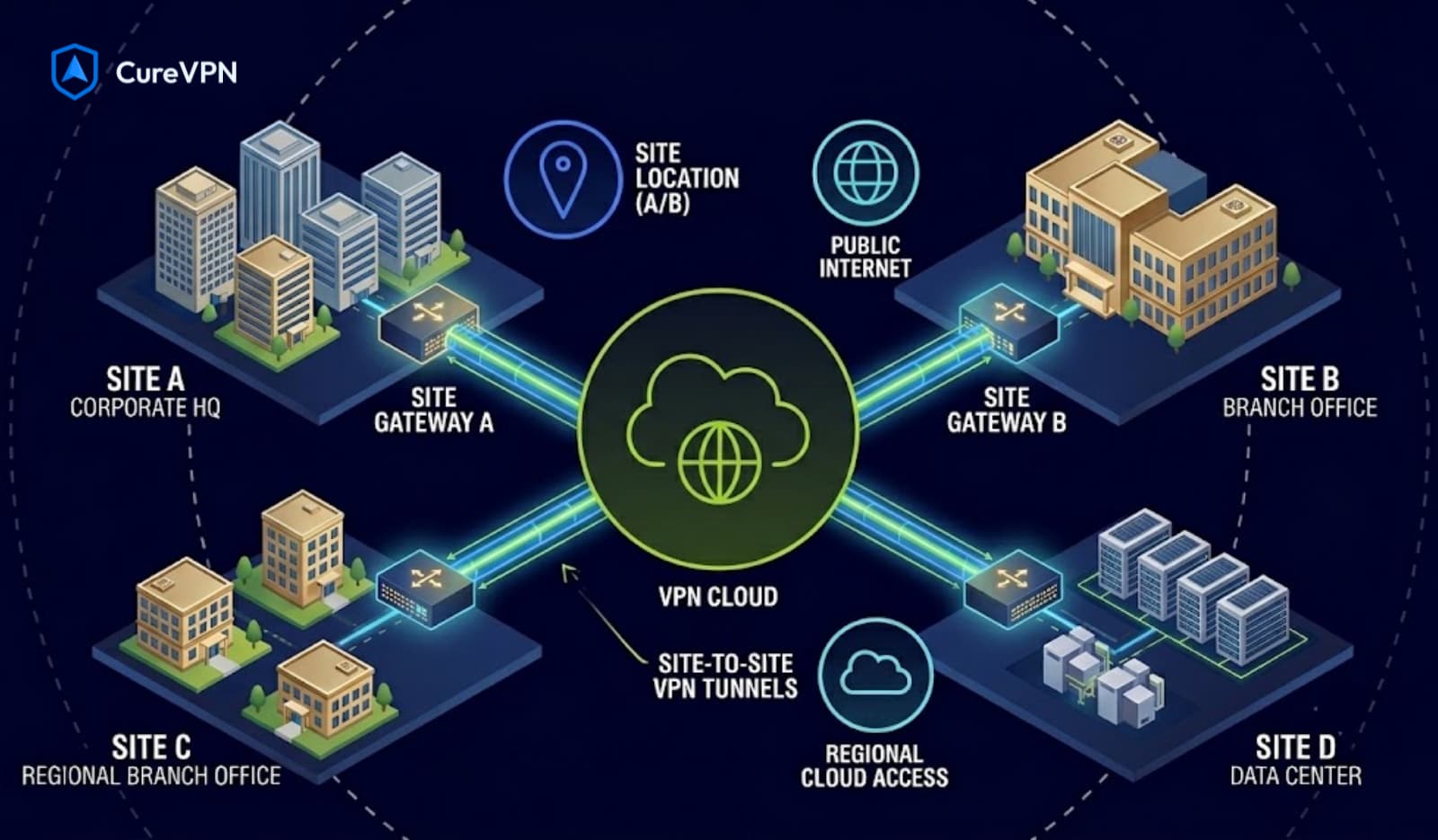
📌 Featured Snippet Definition: A site-to-site VPN is a permanent, encrypted connection between two or more physically separate networks — typically corporate offices, data centers, or cloud environments — that makes them appear as a single unified network. Unlike personal VPNs used by individuals, site-to-site VPNs operate at the network gateway level, requiring no software installation on end-user devices.
Think of it this way: your New York office and your London branch are thousands of miles apart. Without a site-to-site VPN, employees on both sides need separate credentials, separate tools, and separate security policies to access shared resources. With one, both offices share a single logical network — file servers, CRMs, internal apps, printers, and databases become accessible as if everyone sits in the same building.
The gateway devices (routers, firewalls, or dedicated VPN concentrators) on each end handle all encryption, authentication, and tunnel management automatically. End users don’t install anything. They simply connect to their local network and the VPN handles the rest.
How Site-to-Site VPN Works — Technical Architecture?
Understanding the underlying mechanism helps you configure it correctly and troubleshoot it faster.
The Tunnel Model
A site-to-site VPN creates an encrypted tunnel between two network gateways across a public network (typically the internet). Every packet traveling between the two sites gets encapsulated, encrypted, and forwarded through this tunnel — then decapsulated and decrypted at the remote end.
The process, simplified:
- Device at Site A sends a packet to a resource at Site B
- Site A’s VPN gateway intercepts the packet
- The gateway encrypts the packet using the negotiated cipher suite
- The encrypted packet travels across the internet to Site B’s gateway IP
- Site B’s gateway decrypts the packet
- The original packet is delivered to its destination on Site B’s network
To outside observers — including your ISP — the traffic appears as a stream of encrypted data between two IP addresses. The contents are completely invisible.
Core Components
| Component | Function |
|---|---|
| VPN Gateway / Firewall | Encrypts, decapsulates, and routes traffic at each site |
| VPN Concentrator | Aggregates multiple tunnels; used in hub-and-spoke models |
| IKE (Internet Key Exchange) | Negotiates encryption keys and authentication |
| IPSec / ESP | Encrypts data in transit |
| Tunnel Mode vs Transport Mode | Tunnel mode encrypts entire packets; transport mode encrypts payload only |
| SA (Security Association) | Defines the encryption parameters for a specific tunnel |
Tunnel Mode vs Transport Mode
Most site-to-site VPNs use Tunnel Mode — it encapsulates the entire original IP packet within a new packet, hiding both the payload and the original source/destination headers. Transport Mode only encrypts the payload and is typically used for host-to-host encryption within an already-trusted network.
For any site-to-site deployment crossing the public internet, always use Tunnel Mode.
Site-to-Site vs Client-to-Site VPN
This distinction trips up a surprising number of IT teams. They solve different problems.
📌 Direct Answer: A site-to-site VPN connects two entire networks together permanently at the gateway level. A client-to-site VPN (also called remote access VPN) connects individual user devices to a corporate network on demand. The key difference is permanent network-to-network connectivity vs temporary device-to-network connectivity.
| Feature | Site-to-Site VPN | Client-to-Site VPN |
|---|---|---|
| Connection type | Network ↔ Network | Device ↔ Network |
| Permanence | Always-on | On-demand |
| End-user software needed | No | Yes (VPN client) |
| Setup location | Gateway / Router | Individual devices |
| Best for | Connecting offices, DCs, cloud | Remote workers, travel |
| Scalability | High (gateway handles all traffic) | Limited by concurrent sessions |
| Management | Centralized | Per-device or MDM |
| Protocols | IPSec/IKEv2, GRE, OpenVPN | WireGuard, IKEv2, OpenVPN |
| Typical users | Network admins | Individual employees |
When to Use Site-to-Site
Choose site-to-site VPN when:
- You have two or more permanent physical offices that need shared network access
- You’re connecting on-premise infrastructure to AWS, Azure, or Google Cloud
- You need branch offices to share a centralized data center
- Compliance requirements demand encrypted inter-office communication
When to Use Client-to-Site
Choose client-to-site VPN when:
- Employees work remotely and need access to internal resources
- You need per-user access control and authentication
- Your workforce is distributed without fixed office locations
- You’re implementing a Zero Trust network access model
Many enterprise organizations deploy both simultaneously — site-to-site for office connectivity and client-to-site for remote workers.
Types of Site-to-Site VPN
Not all site-to-site VPNs share the same architecture. The topology you choose directly affects performance, cost, and resilience.
1. Intranet VPN
Connects multiple internal offices of the same organization. The most common deployment model — a company with headquarters, regional branches, and a data center all connected over encrypted tunnels across the internet.
2. Extranet VPN
Connects networks belonging to different organizations — typically a company and its partners, suppliers, or customers. Extranet VPNs require careful access segmentation to ensure each external party only reaches permitted resources.
3. Hub-and-Spoke Topology
All branch sites connect to a central hub (typically the headquarters or data center). Traffic between any two branches routes through the hub. Simpler to manage, but the hub becomes a single point of failure and a bottleneck for inter-branch traffic.
Best for: Organizations with a dominant central data center and branches that primarily access central resources.
4. Full Mesh Topology
Every site connects directly to every other site. Eliminates hub dependency and delivers the lowest latency for inter-branch traffic. However, the number of tunnels grows exponentially — with 10 sites, a full mesh requires 45 tunnels.
Best for: Large enterprises with frequent inter-branch traffic and high availability requirements.
5. Partial Mesh Topology
A hybrid approach — critical sites connect directly, while less-trafficked branches use hub routing. Balances performance against management complexity.
📊 [Insert diagram: Hub-and-Spoke vs Full Mesh vs Partial Mesh topology comparison]
Site-to-Site VPN Concentrators — What They Are and Why They Matter
A VPN concentrator is a dedicated network device (or virtual appliance) designed specifically to manage multiple simultaneous VPN tunnels at scale. While a standard router or firewall can handle one or two tunnels, a concentrator is purpose-built for organizations managing dozens or hundreds of connections.
What a VPN Concentrator Does
- Terminates and manages multiple IPSec tunnels simultaneously
- Handles CPU-intensive encryption/decryption at high throughput
- Provides centralized tunnel monitoring and management
- Supports high availability and failover
- Enforces consistent security policies across all tunnels
Hardware vs Software Concentrators
| Hardware Concentrator | Software / Virtual Concentrator | |
|---|---|---|
| Performance | Very high (dedicated ASIC) | Scales with underlying hardware |
| Cost | High upfront | Lower upfront, OPEX model |
| Examples | Cisco ASA, Palo Alto PA-series | Cisco FTD virtual, pfSense, VyOS |
| Best for | Large enterprises, ISPs | Cloud deployments, SMBs |
| Deployment | Physical appliance | VM, container, or cloud instance |
Leading VPN Concentrator Platforms in 2026
- Cisco Adaptive Security Appliance (ASA) — the enterprise standard for IPSec/IKEv2 concentrators
- Palo Alto Networks PA-series — combines next-generation firewall with VPN concentration
- Fortinet FortiGate — strong price-performance ratio for mid-market
- pfSense / OPNsense — open-source options suitable for SMBs and technical teams
- AWS Transit Gateway / Azure VPN Gateway — cloud-native concentrators for hybrid deployments
Site-to-Site VPN Configuration — Step-by-Step
Configuring a site-to-site VPN correctly from the start saves significant troubleshooting time. Here’s the framework that applies across most IPSec/IKEv2 deployments.
Phase 1 — IKE Phase 1 (ISAKMP SA)
IKE Phase 1 establishes the secure channel used to negotiate Phase 2 parameters.
Key configuration decisions:
- Authentication method: Pre-shared key (PSK) or certificates (PKI)
- Encryption: AES-256-GCM (recommended) or AES-128-GCM
- Integrity: SHA-256 or SHA-384
- Diffie-Hellman group: Group 14 (minimum), Group 19 or 20 (recommended)
- IKE version: Always use IKEv2 — IKEv1 is deprecated and vulnerable
Recommended IKE Phase 1 parameters (2026 standard):
Encryption:       AES-256-GCM
Integrity:        SHA-384
PRF:              SHA-384
DH Group:         ECP-384 (Group 20)
Lifetime:         86400 seconds (24 hours)
IKE version:      IKEv2
Phase 2 — IKE Phase 2 (IPSec SA)
Phase 2 negotiates the actual data encryption tunnel (ESP — Encapsulating Security Payload).
Recommended IPSec Phase 2 parameters:
Encryption:       AES-256-GCM
PFS:              Enabled (Group 20)
Lifetime:         3600 seconds (1 hour)
Mode:             Tunnel
Step-by-Step Configuration Framework
Step 1 — Document your network parameters Before touching any device, record: local subnet(s), remote subnet(s), remote gateway public IP, authentication method, and required cipher suite.
Step 2 — Configure IKE Phase 1 on both gateways Match parameters exactly on both sides — a single mismatch causes the tunnel to fail at handshake. IKEv2 provides better diagnostics than IKEv1 when mismatches occur.
Step 3 — Configure IPSec Phase 2 on both gateways Define the traffic selectors (which source and destination subnets should route through the tunnel). Mismatched traffic selectors are the single most common cause of connectivity failures.
Step 4 — Configure routing Add static routes (or configure dynamic routing via BGP/OSPF) pointing remote subnets toward the VPN interface. Without correct routing, traffic won’t enter the tunnel even if the tunnel establishes successfully.
Step 5 — Firewall rules Allow IKE (UDP 500), NAT-T (UDP 4500), and ESP (protocol 50) in both directions. Understanding TCP vs UDP VPN Ports is essential here — misconfigured firewall rules are responsible for a large percentage of site-to-site VPN failures.
Step 6 — Test and verify Ping across the tunnel. Check IKE SA and IPSec SA status on both gateways. Run packet captures if connectivity fails. Verify that DNS resolution works correctly through the tunnel for internal hostnames.
Step 7 — Encrypt DNS traffic Ensure internal DNS queries between sites travel through the VPN tunnel. Split DNS configuration should route internal domain resolution through on-premise DNS servers, with encrypted DNS traffic preventing exposure of internal domain names to external resolvers.
📊 [Insert diagram: Site-to-site VPN configuration flow — Phase 1 → Phase 2 → routing → firewall → verification]
Best Protocols for Site-to-Site VPN
| Protocol | Recommended For | Speed | Security | NAT Traversal |
|---|---|---|---|---|
| IKEv2/IPSec | Enterprise, compliance-driven | ⚡⚡⚡ | ✅ High | ✅ (UDP 4500) |
| WireGuard | Cloud, Linux-native, performance | ⚡⚡⚡⚡ | ✅ High | ✅ |
| OpenVPN | Firewall bypass needed | ⚡⚡ | ✅ High | ✅ (TCP 443) |
| GRE + IPSec | Multicast / dynamic routing | ⚡⚡⚡ | ✅ High | Limited |
| DMVPN | Large hub-and-spoke / spoke-to-spoke | ⚡⚡⚡ | ✅ High | ✅ |
IKEv2/IPSec — The Enterprise Standard
IKEv2 paired with IPSec remains the most widely deployed site-to-site VPN protocol in enterprise environments. It supports FIPS 140-2 compliant cipher modes, integrates natively with Cisco, Palo Alto, Fortinet, and Juniper devices, and handles complex multi-site topologies reliably.
WireGuard — The Cloud-Native Choice
WireGuard’s kernel-level performance and minimal configuration overhead make it increasingly popular for cloud-to-cloud and cloud-to-on-premise tunnels. Its ~4,000-line codebase (vs IKEv2/IPSec’s ~400,000) dramatically reduces attack surface. AWS, Azure, and GCP all support WireGuard-based connections.
GRE + IPSec — When You Need Dynamic Routing
Generic Routing Encapsulation (GRE) tunnels don’t encrypt traffic by themselves, but pairing them with IPSec provides both multicast support and encryption. This combination enables OSPF or BGP to run over site-to-site tunnels — essential for organizations with complex dynamic routing requirements.
Best Encryption for VPN Security — AES-256 vs AES-128
For site-to-site VPN deployments, cipher selection directly affects both security posture and performance. This matters particularly on lower-powered gateway hardware.
📌 Direct Answer: AES-256-GCM is the recommended encryption standard for site-to-site VPNs in 2026. It provides a larger security margin against future quantum computing threats and meets FIPS 140-2 requirements. On modern hardware with AES-NI acceleration, the performance penalty versus AES-128 is negligible — typically under 5%.
| AES-128-GCM | AES-256-GCM | |
|---|---|---|
| Key length | 128 bits | 256 bits |
| Security rounds | 10 | 14 |
| Quantum resistance | Moderate | Strong |
| FIPS 140-2 compliant | ✅ | ✅ |
| NSA Suite B | No | ✅ (Suite B High) |
| Performance penalty | Baseline | ~5% on AES-NI hardware |
| Performance (no AES-NI) | Fast | ~40% slower |
| Recommended for | High-performance non-sensitive | Enterprise, compliance, sensitive data |
For gateway hardware without AES-NI (many older routers and some embedded systems), the performance gap between AES-256 and AES-128 widens significantly. In those scenarios, either upgrade the hardware or consider WireGuard’s ChaCha20-Poly1305, which doesn’t require AES hardware acceleration and delivers excellent throughput on any CPU.
Encrypted DNS Traffic in Site-to-Site Deployments
DNS security is frequently the most overlooked element of enterprise VPN configuration — and one of the most impactful.
In a typical site-to-site setup, employees at branch offices query internal DNS servers located at headquarters. Without proper configuration, several risks emerge:
- DNS leaks: Queries bypass the VPN tunnel and resolve through the ISP’s public resolver, exposing internal domain names
- DNS hijacking: Attackers intercept unencrypted DNS queries on the branch’s local network
- Split-brain DNS failures: Internal hostnames fail to resolve if DNS routing isn’t correctly configured through the tunnel
Best Practices for DNS in Site-to-Site VPNs
- Configure the branch gateway to forward internal domain queries to the headquarters DNS server through the VPN tunnel
- Use DNS-over-HTTPS (DoH) or DNS-over-TLS (DoT) for external resolution to prevent ISP-level DNS surveillance
- Implement split DNS — internal domains resolve internally, external domains resolve through an encrypted public resolver
- Deploy DNSSEC for internal zones where possible
- Monitor DNS traffic for anomalous query patterns as an intrusion detection signal
Cure VPN’s enterprise-grade DNS implementation routes all queries through encrypted channels by default, with built-in split DNS support for hybrid deployments — eliminating the configuration complexity that causes most DNS-related VPN failures.
Real-World Use Cases
Use Case 1 — Multinational Retail Chain
A retail company with 200 locations across the United States, Europe, and Asia needed to connect each store to a central inventory management system. They deployed a hub-and-spoke IPSec/IKEv2 topology with redundant concentrators at their primary and secondary data centers. Each store’s router established two tunnels (primary and backup), with automatic failover. Result: a single unified network across 200 locations, with centralized policy management and sub-50ms failover time.
Use Case 2 — AWS Hybrid Cloud
A financial services company maintained on-premise infrastructure for regulatory compliance but needed cloud-based analytics. They configured a WireGuard site-to-site tunnel between their on-premise data center and an AWS VPC. WireGuard’s kernel-level performance on the Linux-based gateway delivered 950 Mbps throughput — far exceeding what was possible with their previous OpenVPN configuration.
Use Case 3 — MSP Managing Client Networks
A managed service provider used DMVPN to connect 50 client networks back to their network operations center. DMVPN’s spoke-to-spoke capability allowed direct client-to-client communication when needed, while centralized management at the NOC enabled consistent security policy enforcement across all clients.
Use Case 4 — Construction Company with Temporary Sites
A large construction firm needed temporary VPN connectivity at project sites worldwide. Rather than deploying hardware concentrators at each site, they deployed cloud-native WireGuard endpoints that field teams could configure in under 10 minutes. Project sites came online within a day of setup, connected securely to the central HR, payroll, and project management systems.
Site-to-Site VPN and Cloud Infrastructure
Modern enterprises rarely operate purely on-premise. Today’s deployments almost always involve hybrid or multi-cloud connectivity — and site-to-site VPN is the foundation.
AWS Site-to-Site VPN
AWS offers a managed Site-to-Site VPN service through AWS Transit Gateway and the Virtual Private Gateway (VGW). It supports IKEv2/IPSec with AES-256 and can deliver up to 1.25 Gbps per tunnel, with multiple tunnels supported in parallel for higher aggregate throughput.
Azure VPN Gateway
Microsoft Azure’s VPN Gateway supports IKEv2 and OpenVPN, with active-active configurations for high availability. The VpnGw5 SKU delivers up to 100 Gbps aggregate throughput.
Google Cloud VPN
Google Cloud HA VPN supports IKEv2 and offers 99.99% availability SLA with active-active configuration. Each tunnel delivers up to 3 Gbps throughput.
WireGuard on Cloud VMs
Alternatively, deploying WireGuard on cloud VM instances (EC2, Azure VM, GCE) gives network engineers full protocol control, typically at lower cost than managed VPN gateways — at the expense of managing the infrastructure themselves.
Common Mistakes to Avoid
1. Using IKEv1 in 2026 IKEv1 has known vulnerabilities (Aggressive Mode attacks, weak PSK susceptibility) and is deprecated by RFC 9395. Every deployment should use IKEv2 exclusively.
2. Weak pre-shared keys A short or dictionary-based PSK completely undermines AES-256 encryption. Use certificate-based authentication for enterprise deployments, or generate random PSKs of at least 32 characters.
3. Mismatched traffic selectors Traffic selectors (the subnets permitted through the tunnel) must match exactly on both gateways. Even a subnet mask mismatch (e.g., /24 vs /23) causes the tunnel to establish but no traffic to flow — a notoriously confusing failure mode.
4. No Perfect Forward Secrecy PFS ensures that a compromised long-term key doesn’t expose past session traffic. Always enable PFS with DH Group 14 minimum, Group 19 or 20 preferred.
5. Single tunnel without redundancy A single site-to-site tunnel creates a single point of failure. Production deployments need at least two tunnels (different ISP paths if possible) with automatic failover.
6. Ignoring MTU / fragmentation issues VPN encapsulation adds overhead to each packet, reducing effective MTU. Without MSS clamping and proper MTU configuration, large packets fragment — causing performance degradation and intermittent connectivity failures that are painful to diagnose.
7. No monitoring or alerting A tunnel that silently fails at 2 AM won’t be detected until employees arrive the next morning. Deploy tunnel state monitoring with alerting for any SA that drops unexpectedly.
Best Practices for Site-to-Site VPN in 2026
✅ Use IKEv2 exclusively — abandon IKEv1 entirely
✅ Deploy AES-256-GCM as your standard cipher suite
✅ Enable Perfect Forward Secrecy with DH Group 19 or 20
✅ Use certificate-based authentication for enterprise deployments — PSK is acceptable only for small, low-risk configurations
✅ Configure redundant tunnels across diverse ISP paths
✅ Monitor tunnel state with automated alerting
✅ Implement split DNS with encrypted DNS traffic through the tunnel
✅ Set MTU and MSS correctly — configure MSS clamping at the gateway
✅ Review and rotate credentials on a defined schedule
✅ Document every tunnel — network, gateway IPs, cipher suite, authentication method, creation date, last reviewed date
✅ Consider WireGuard for cloud-native tunnels — particularly for Linux-based gateways and cloud VM deployments
Expert Insights
On protocol selection: The “always use IPSec” default that governed enterprise networking for 20 years is giving way to a more nuanced approach. WireGuard has earned its place in production site-to-site deployments — particularly cloud-to-cloud and cloud-to-on-premise scenarios where Linux gateways are the norm. For Cisco-native environments and compliance-driven deployments, IKEv2/IPSec remains the right answer. The distinction matters.
On concentrator sizing: The most common concentrator sizing mistake is planning for current load. VPN traffic grows faster than most network teams anticipate — remote work adoption, new cloud services, and partner integrations all add tunnels and traffic. Size for 3× your current peak load, and choose platforms with transparent horizontal scaling paths.
On Zero Trust integration: Site-to-site VPN and Zero Trust Network Access (ZTNA) are often positioned as alternatives. They’re not — they’re complementary. Site-to-site VPN handles network-to-network connectivity between trusted infrastructure. ZTNA handles per-user, per-application access control for the human layer. Modern enterprise architectures need both.
On gaming and latency: Organizations running latency-sensitive applications (trading platforms, real-time collaboration tools, VoIP) over site-to-site VPNs benefit significantly from WireGuard’s lower protocol overhead. The same principles that make WireGuard the choice for Best VPN for Gaming — minimal overhead, kernel-level processing — translate directly to enterprise application performance. If a VPN can affect your ping, the same is true for enterprise application latency over site-to-site tunnels.
Statistics & Data
- 93% of enterprises use VPN infrastructure (Statista, 2024)
- The global VPN market is projected to reach $534.22 billion by 2034, at 22.04% CAGR (Precedence Research, 2024)
- 56% of organizations have experienced cyberattacks related to VPN vulnerabilities (Zscaler ThreatLabz, 2024)
- 91% of ransomware attacks exploit unpatched VPN vulnerabilities as an initial access vector (Ivanti Threat Intelligence, 2024)
- AWS Site-to-Site VPN supports up to 1.25 Gbps throughput per tunnel (AWS documentation, 2026)
- Azure VPN Gateway VpnGw5 delivers up to 100 Gbps aggregate throughput (Microsoft Azure documentation, 2026)
- IKEv1 was formally deprecated by RFC 9395 (IETF, 2023)
- WireGuard was merged into Linux kernel 5.6 in March 2020 (kernel.org)
- AES-256-GCM is classified as NSA Suite B for TOP SECRET communications (NSA CNSA Suite, 2015, updated 2022)
FAQs — Site-to-Site VPN
Q: What is a site-to-site VPN in simple terms?
A site-to-site VPN creates a permanent encrypted tunnel between two entire networks — for example, connecting a company’s New York and London offices so they share a single network. Users at either location access shared resources without any VPN software on their devices.
Q: What is the difference between site-to-site and client-to-site VPN?
A site-to-site VPN connects two networks permanently at the gateway level. A client-to-site VPN connects individual user devices to a network on demand, requiring VPN client software on each device. Enterprises typically deploy both simultaneously.
Q: What is a VPN concentrator?
A VPN concentrator is a dedicated network device that manages multiple simultaneous VPN tunnels. It handles CPU-intensive encryption and decryption at scale, provides centralized management, and supports high availability. Examples include Cisco ASA, Palo Alto firewalls, and cloud services like AWS Transit Gateway.
Q: Which protocol is best for site-to-site VPN?
IKEv2/IPSec is the enterprise standard, offering strong security, FIPS compliance, and broad hardware compatibility. WireGuard is increasingly preferred for cloud-native and Linux-based deployments due to its performance and simplicity. Never use IKEv1 — it’s deprecated with known vulnerabilities.
Q: What ports does site-to-site VPN use?
IKEv2/IPSec uses UDP port 500 for IKE negotiation and UDP port 4500 for NAT traversal. ESP (Encapsulating Security Payload) uses IP protocol 50. Understanding TCP vs UDP VPN Ports is critical for firewall configuration. WireGuard uses a configurable UDP port (default 51820).
Q: Is AES-256 required for site-to-site VPN?
AES-256-GCM is strongly recommended for enterprise deployments and is required for NSA Suite B compliance. On modern hardware with AES-NI acceleration, the performance penalty is negligible. AES-128-GCM is acceptable for non-sensitive deployments where performance on older hardware is a constraint.
Q: How do I configure a site-to-site VPN?
Configure IKE Phase 1 (encryption, integrity, DH group, authentication), then IKE Phase 2 (IPSec SA, traffic selectors, PFS). Add routing to direct remote-subnet traffic into the tunnel. Configure firewall rules for UDP 500, 4500, and ESP. Test with pings and SA verification. Always document your configuration parameters.
Q: Can site-to-site VPN connect to cloud services like AWS?
Yes. AWS, Azure, and Google Cloud all offer managed site-to-site VPN services. AWS Transit Gateway and Virtual Private Gateway support IKEv2/IPSec with AES-256. Alternatively, WireGuard on cloud VM instances provides more flexibility with lower cost.
Q: What is split tunneling in site-to-site VPN?
Split tunneling routes only specific traffic (e.g., traffic destined for the remote network) through the VPN tunnel, while other traffic (e.g., internet browsing) uses the local gateway directly. This reduces bandwidth consumption at the central site. Full tunneling routes all traffic through the tunnel, providing more centralized security control.
Q: How do you secure DNS in a site-to-site VPN?
Configure branch offices to forward internal domain queries to headquarters DNS servers through the VPN tunnel. Use DNS-over-HTTPS or DNS-over-TLS for external resolution. Implement split DNS to separate internal and external name resolution. Monitor for DNS leaks that bypass the tunnel.
Q: What causes site-to-site VPN tunnels to drop?
Common causes include ISP-level packet loss, NAT table timeouts (particularly with long idle tunnels), DPD (Dead Peer Detection) misconfiguration, IKE rekeying failures, and hardware resource exhaustion on gateways. Configure DPD correctly and use keepalive traffic to prevent idle tunnel timeouts.
Q: Is site-to-site VPN suitable for gaming or low-latency applications?
A well-configured site-to-site VPN with WireGuard and nearby gateways can deliver excellent latency. For latency-sensitive enterprise applications — or if you’re curious how a VPN can affect your ping — WireGuard’s protocol overhead of 1–3ms outperforms IKEv2’s 3–7ms. See our Best Gaming VPN guide for the full protocol comparison.
Key Takeaways
- A site-to-site VPN permanently connects two networks at the gateway level — no end-user software required
- It differs fundamentally from client-to-site VPN, which connects individual devices on demand
- VPN concentrators aggregate and manage multiple tunnels at scale — essential for hub-and-spoke enterprise deployments
- Always use IKEv2 — IKEv1 is deprecated with documented vulnerabilities
- AES-256-GCM is the recommended cipher; enable Perfect Forward Secrecy with DH Group 19 or 20
- WireGuard is increasingly the right choice for cloud-native and Linux-based site-to-site deployments
- Redundant tunnels, correct MTU configuration, DNS encryption, and active monitoring are non-negotiable in production
- Cloud providers (AWS, Azure, GCP) all offer managed site-to-site VPN services with IKEv2 support
Your Network Deserves Enterprise-Grade Protection — Without Enterprise Complexity
Building secure site-to-site connectivity shouldn’t require a team of senior network engineers and a six-figure hardware budget. Yet that’s exactly what legacy VPN infrastructure demands from most businesses. Cure VPN changes that equation entirely.
Whether you’re connecting two offices, bridging cloud and on-premise infrastructure, or building a white-label VPN product for your own enterprise clients — Cure VPN’s architecture is built on the same principles this entire guide is built around: IKEv2 and WireGuard working together, AES-256-GCM encryption by default, encrypted DNS on every connection, and zero-logs privacy baked into the core.
Hundreds of businesses across the United States, Europe, Brazil, India, and Australia already rely on Cure VPN’s infrastructure to keep their networks connected, encrypted, and fast.
The next site-to-site tunnel you configure deserves the right foundation.
👉 Explore Cure VPN’s Enterprise Solutions — Start Protecting Your Network Today
Multi-protocol support. AES-256 encryption. Global server infrastructure. Built for the way businesses actually work in 2026.